

Overview
Supabase edge functions allow you to trigger tasks either when an event is sent from a third party (e.g. when a new Stripe payment is processed, when a new user signs up to a service, etc), or when there are any changes or updates to your Supabase database. This guide shows you how to set up and deploy a simple Supabase edge function example that triggers a task when an edge function URL is accessed.Prerequisites
- Ensure you have the Supabase CLI installed
- Since Supabase CLI version 1.123.4, you must have Docker Desktop installed to deploy Edge Functions
- Ensure TypeScript is installed
- Create a Trigger.dev account
- Create a new Trigger.dev project
GitHub repo
View the project on GitHub
Click here to view the full code for this project in our examples repository on GitHub. You can
fork it and use it as a starting point for your own project.
Initial setup
1
Optional step 1: create a new Supabase project
If you already have a Supabase project on your local machine you can skip this step.
If you are using VS Code, ensure to answer ‘y’ when asked to generate VS Code settings for Deno,
and install any recommended extensions.
2
Optional step 2: create a package.json file
If your project does not already have This is required for the Trigger.dev SDK to work correctly.
package.json file (e.g. if you are using Deno), create it manually in your project’s root folder. If your project has a
package.json file you can skip this step.package.json
Update your Typescript version to the latest version available.
3
Run the CLI init command
The easiest way to get started is to use the CLI. It will add Trigger.dev to your existing project, create a It will do a few things:
/trigger folder and give you an example task.Run this command in the root of your project to get started:- Log you into the CLI if you’re not already logged in.
- Create a
trigger.config.tsfile in the root of your project. - Ask where you’d like to create the
/triggerdirectory. - Create the
/triggerdirectory with an example task,/trigger/example.[ts/js].
4
Run the CLI dev command
The CLI
dev command runs a server for your tasks. It watches for changes in your /trigger directory and communicates with the Trigger.dev platform to register your tasks, perform runs, and send data back and forth.It can also update your @trigger.dev/* packages to prevent version mismatches and failed deploys. You will always be prompted first.5
Perform a test run using the dashboard
The CLI 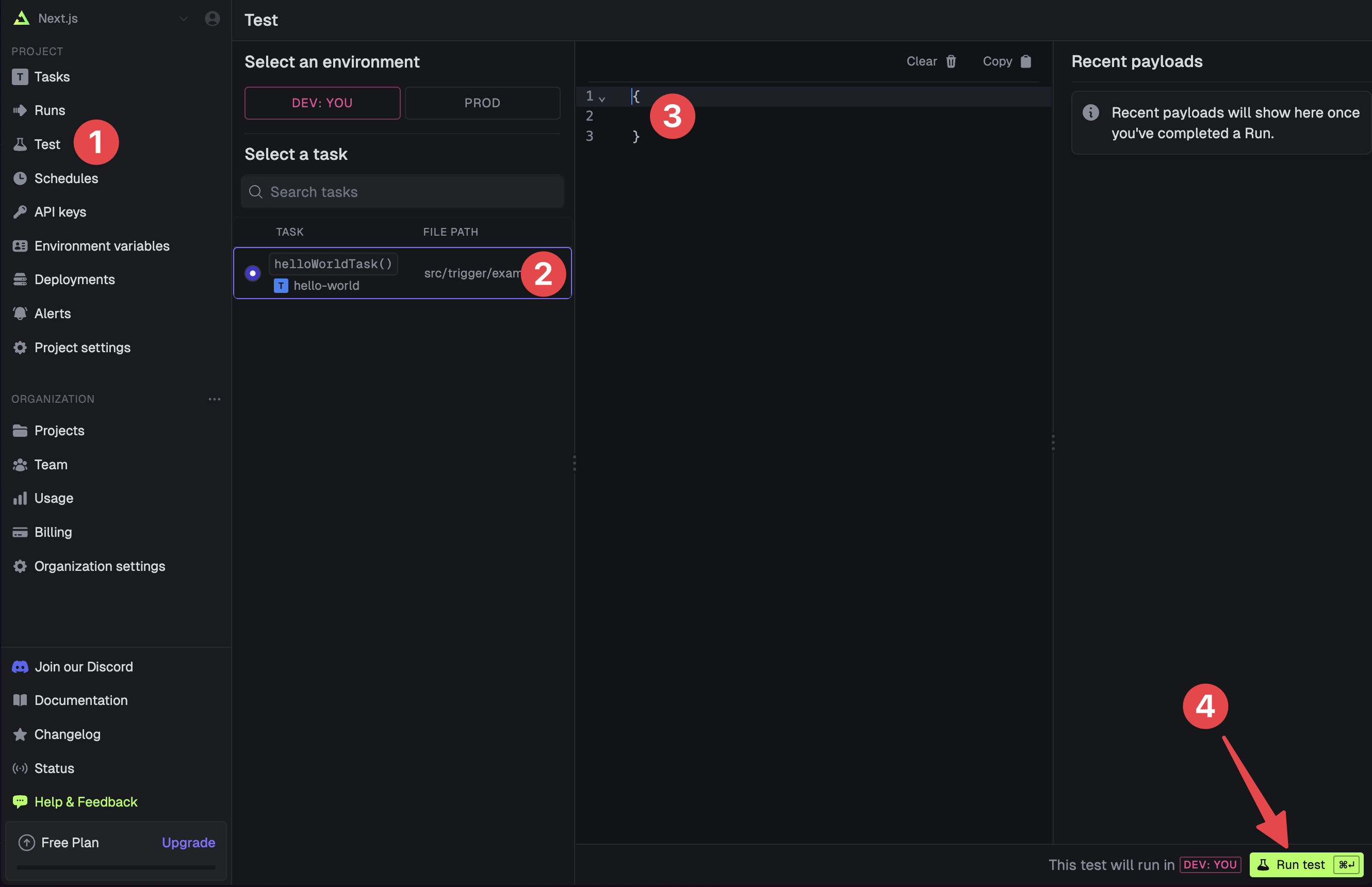
dev command spits out various useful URLs. Right now we want to visit the Test page .You should see our Example task in the list , select it. Most tasks have a “payload” which you enter in the JSON editor , but our example task doesn’t need any input.Press the “Run test” button .6
View your run
Congratulations, you should see the run page which will live reload showing you the current state of the run.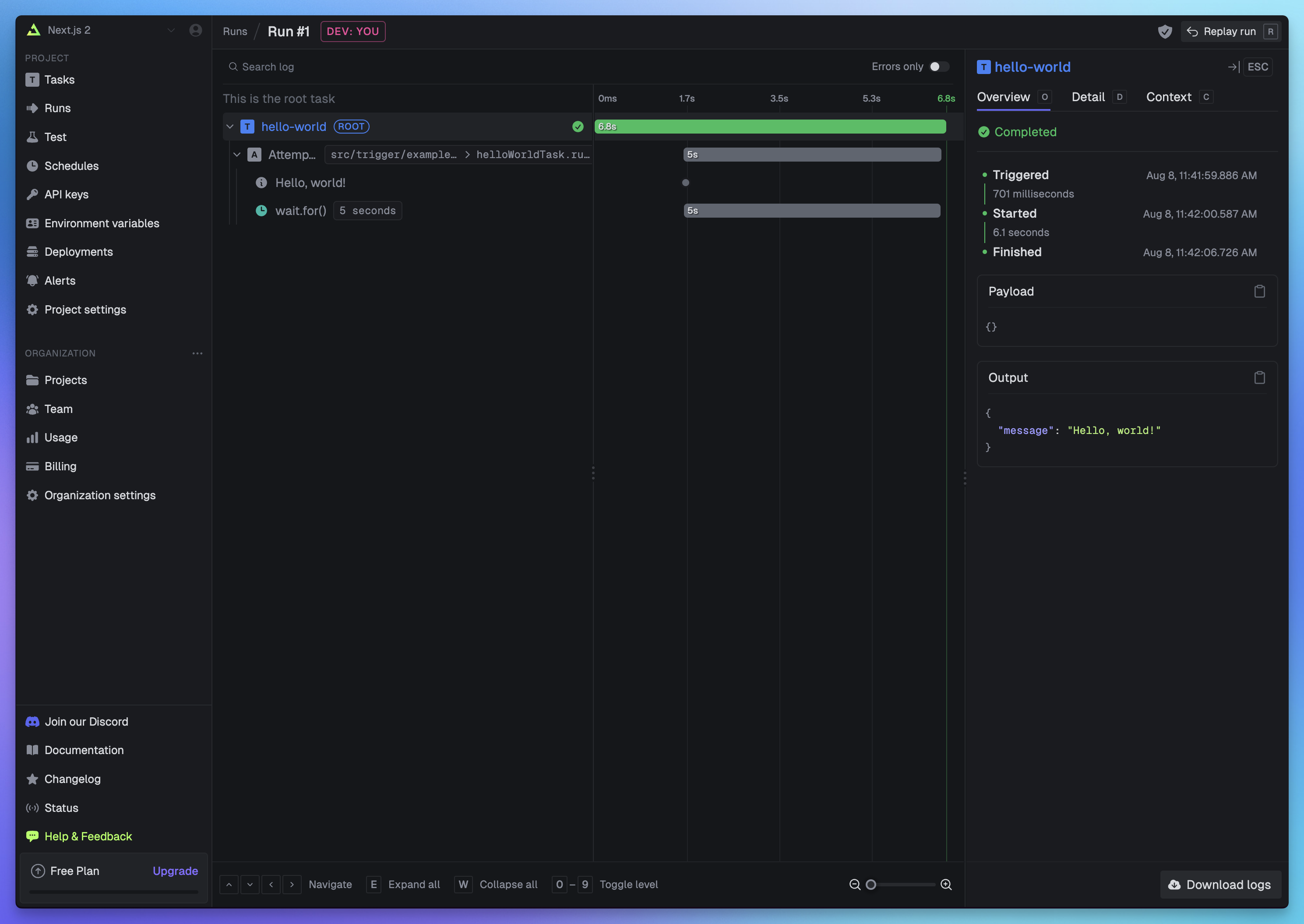 If you go back to your terminal you’ll see that the dev command also shows the task status and links to the run log.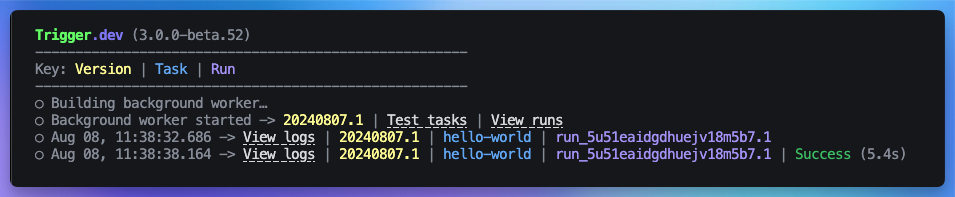
If you go back to your terminal you’ll see that the dev command also shows the task status and links to the run log.Create a new Supabase edge function and deploy it
1
Create a new Supabase edge function
We’ll call this example
edge-function-trigger.In your project, run the following command in the terminal using the Supabase CLI:2
Update the edge function code
Replace the placeholder code in your
edge-function-trigger/index.ts file with the following:functions/edge-function-trigger/index.ts
You can only import the
type from the task.Tasks in the
trigger folder use Node, so they must stay in there or they will not run,
especially if you are using a different runtime like Deno. Also do not add “npm:” to imports
inside your task files, for the same reason.3
Deploy your edge function using the Supabase CLI
You can now deploy your edge function with the following command in your terminal:Follow the CLI instructions and once complete you should now see your new edge function deployment in your Supabase edge functions dashboard.There will be a link to the dashboard in your terminal output, or you can find it at this URL:
To learn more about how to properly configure Supabase auth for Trigger.dev tasks, please refer to
our Supabase Authentication guide. It demonstrates
how to use JWT authentication for user-specific operations or your service role key for
admin-level access.
https://supabase.com/dashboard/project/<your-project-id>/functionsReplace
your-project-id with your actual project ID.Set your Trigger.dev prod secret key in the Supabase dashboard
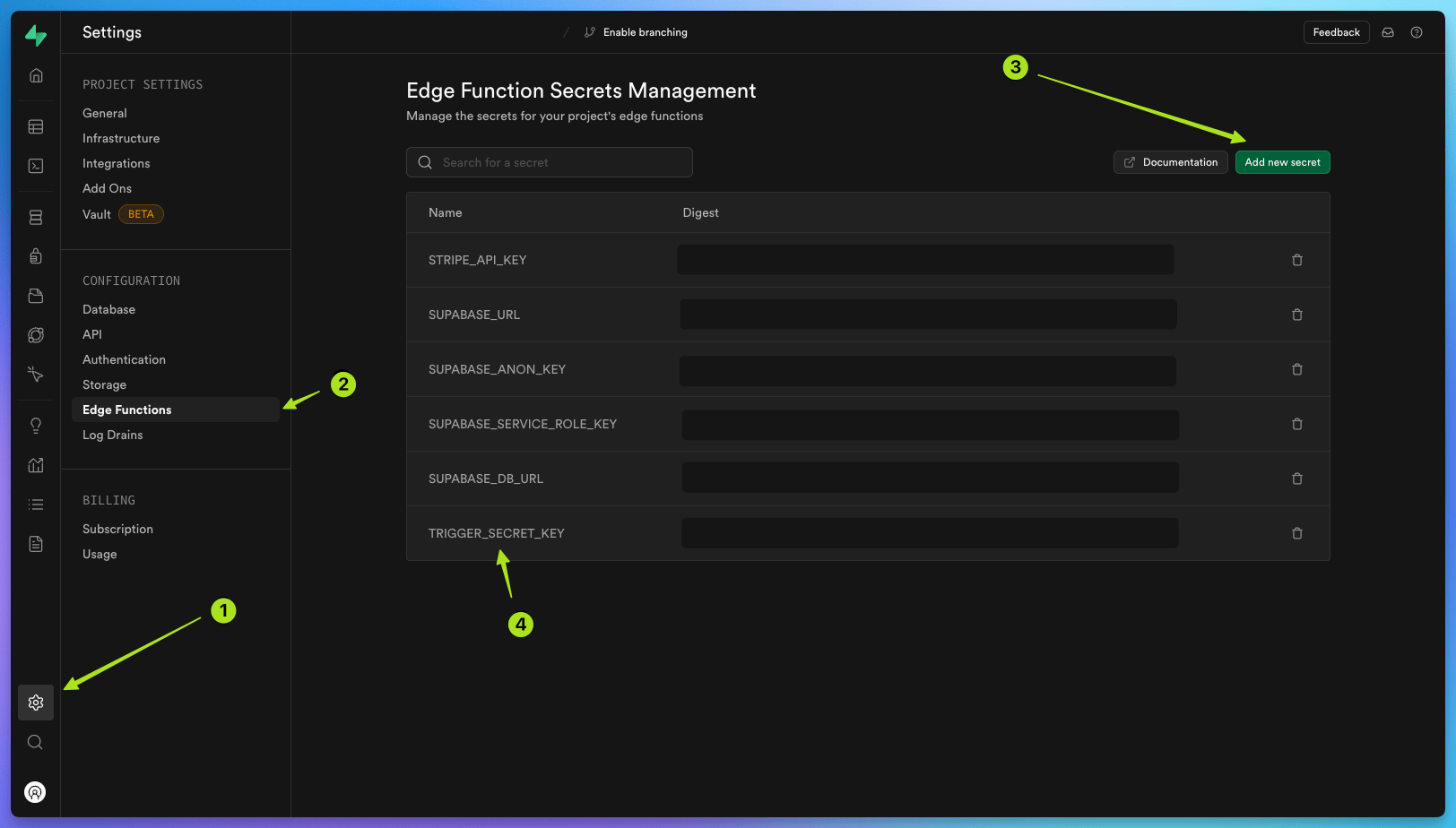
To trigger a task from your edge function, you need to set your Trigger.dev secret key in the Supabase dashboard. To do this, first go to your Trigger.dev project dashboard and copy theprod secret key from the API keys page.
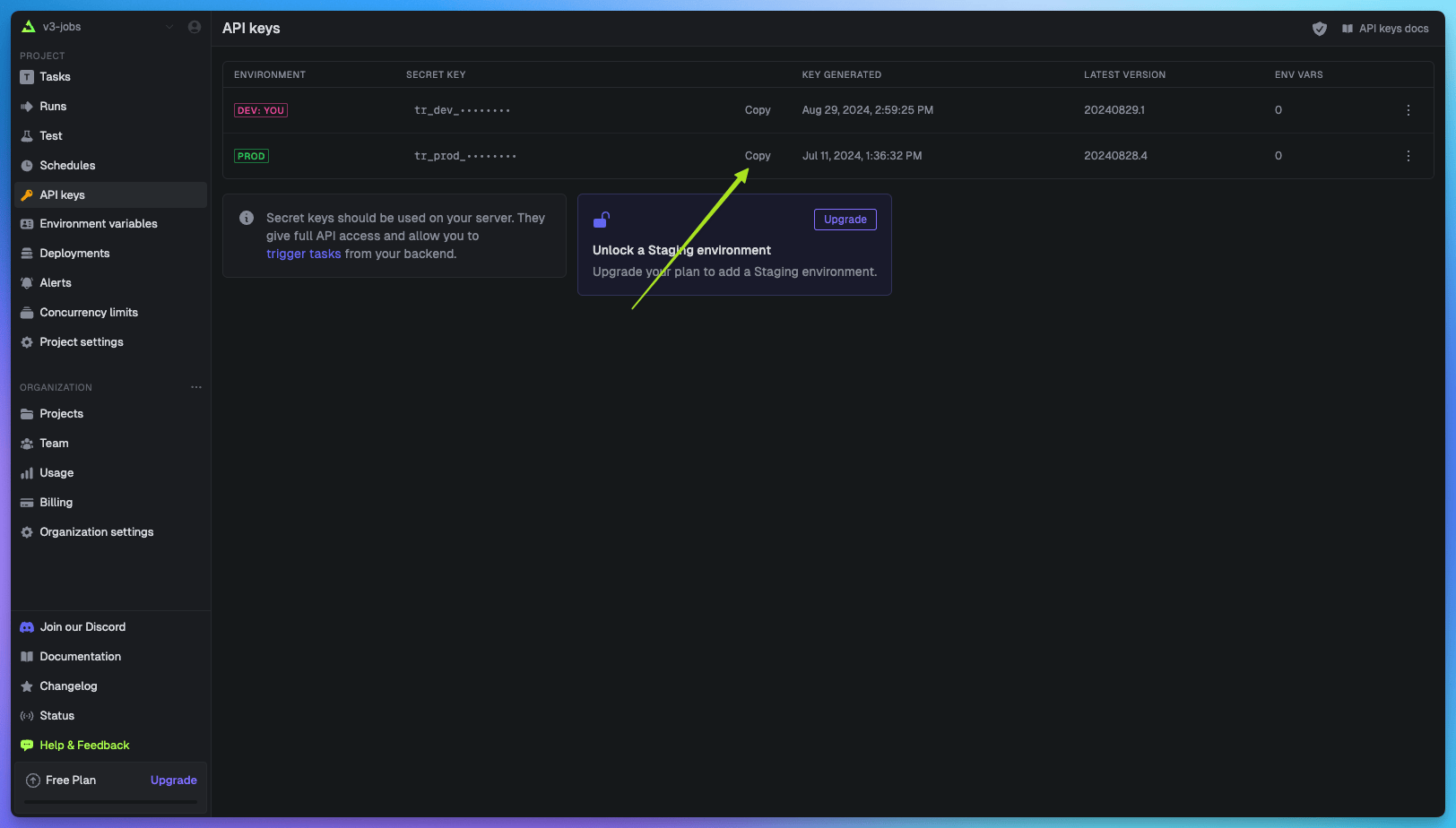 Then, in Supabase, select your project, navigate to ‘Project settings’ , click ‘Edge functions’ in the configurations menu, and then click the ‘Add new secret’ button.
Add
Then, in Supabase, select your project, navigate to ‘Project settings’ , click ‘Edge functions’ in the configurations menu, and then click the ‘Add new secret’ button.
Add TRIGGER_SECRET_KEY with the pasted value of your Trigger.dev prod secret key.
Deploy your task and trigger it from your edge function
1
Deploy your 'Hello World' task
Next, deploy your
hello-world task to Trigger.dev cloud.2
Trigger a prod run from your deployed edge function
To do this all you need to do is simply open the In your Supabase project, go to your Edge function dashboard, find 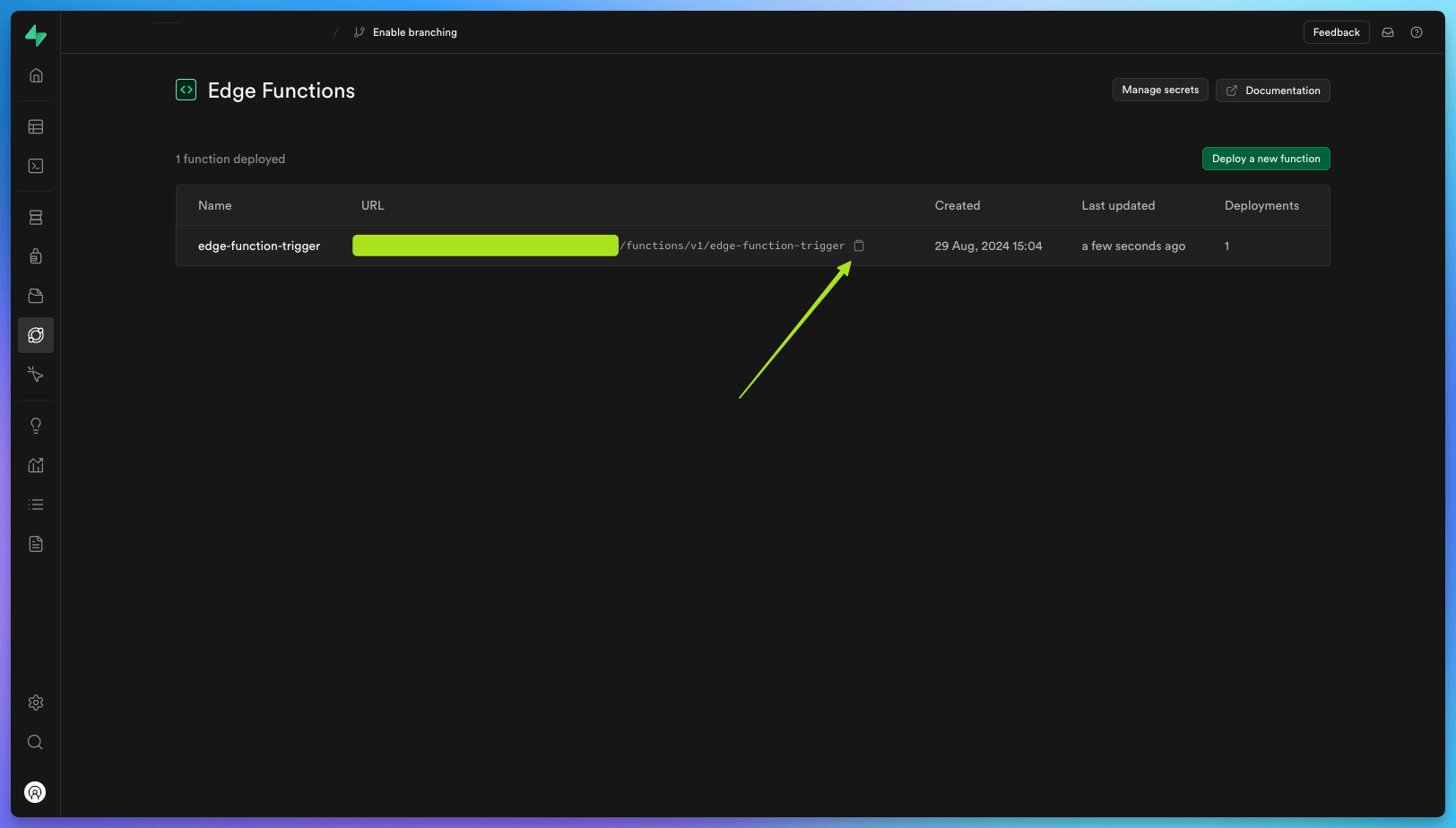 The task will be triggered when your edge function URL is accessed.Check your cloud.trigger.dev dashboard and you should see a succesful
edge-function-trigger URL.https://supabase.com/dashboard/project/<your-project-id>/functionsReplace
your-project-id with your actual project ID.edge-function-trigger, copy the URL, and paste it into a new window in your browser.Once loaded you should see ‘OK’ on the new screen.The task will be triggered when your edge function URL is accessed.Check your cloud.trigger.dev dashboard and you should see a succesful hello-world task.Congratulations, you have run a simple Hello World task from a Supabase edge function!Learn more about Supabase and Trigger.dev
Full walkthrough guides from development to deployment
Edge function hello world guide
Learn how to trigger a task from a Supabase edge function when a URL is visited.
Database webhooks guide
Learn how to trigger a task from a Supabase edge function when an event occurs in your database.
Supabase authentication guide
Learn how to authenticate Supabase tasks using JWTs for Row Level Security (RLS) or service role
keys for admin access.
Task examples with code you can copy and paste
Supabase database operations
Run basic CRUD operations on a table in a Supabase database using Trigger.dev.
Supabase Storage upload
Download a video from a URL and upload it to Supabase Storage using S3.