

Trigger functions
Trigger tasks from your backend:
Trigger tasks from inside a another task:
Triggering from your backend
When you trigger a task from your backend code, you need to set theTRIGGER_SECRET_KEY environment variable. You can find the value on the API keys page in the Trigger.dev dashboard. More info on API keys.
If you are using Next.js Server Actions you’ll need to be careful with
bundling.
tasks.trigger()
Triggers a single run of a task with the payload you pass in, and any options you specify, without needing to import the task.By using
tasks.trigger(), you can pass in the task type as a generic argument, giving you full
type checking. Make sure you use a type import so that your task code is not imported into your
application.Your backend
Your backend
tasks.batchTrigger()
Triggers multiple runs of a single task with the payloads you pass in, and any options you specify, without needing to import the task.Your backend
batchTrigger function using the second argument:
Your backend
Your backend
tasks.triggerAndPoll()
Triggers a single run of a task with the payload you pass in, and any options you specify, and then polls the run until it’s complete.Your backend
batch.trigger()
Triggers multiple runs of different tasks with the payloads you pass in, and any options you specify. This is useful when you need to trigger multiple tasks at once.Your backend
Triggering from inside another task
The following functions should only be used when running inside a task, for one of the following reasons:- You need to wait for the result of the triggered task.
- You need to import the task instance. Importing a task instance from your backend code is not recommended, as it can pull in a lot of unnecessary code and dependencies.
yourTask.trigger()
Triggers a single run of a task with the payload you pass in, and any options you specify.If you need to call
trigger() on a task in a loop, use
batchTrigger() instead which will trigger up to 500 runs in a single
call../trigger/my-task.ts
./trigger/my-task.ts
yourTask.batchTrigger()
Triggers multiple runs of a single task with the payloads you pass in, and any options you specify./trigger/my-task.ts
batchTrigger, you can use the second argument:
/trigger/my-task.ts
/trigger/my-task.ts
yourTask.triggerAndWait()
This is where it gets interesting. You can trigger a task and then wait for the result. This is useful when you need to call a different task and then use the result to continue with your task.Don't use this in parallel, e.g. with Promise.all()
Don't use this in parallel, e.g. with Promise.all()
Instead, use
batchTriggerAndWait() if you can, or a for loop if you can’t.To control concurrency using batch triggers, you can set queue.concurrencyLimit on the child task./trigger/parent.ts
result object is a “Result” type that needs to be checked to see if the child task run was successful:
/trigger/parent.ts
unwrap method:
/trigger/parent.ts
/trigger/parent.ts
yourTask.batchTriggerAndWait()
You can batch trigger a task and wait for all the results. This is useful for the fan-out pattern, where you need to call a task multiple times and then wait for all the results to continue with your task.Don't use this in parallel, e.g. with Promise.all()
Don't use this in parallel, e.g. with Promise.all()
Instead, pass in all items at once and set an appropriate
maxConcurrency. Alternatively, use sequentially with a for loop.To control concurrency, you can set queue.concurrencyLimit on the child task.How to handle run failures
How to handle run failures
When using
batchTriggerAndWait, you have full control over how to handle failures within the batch. The method returns an array of run results, allowing you to inspect each run’s outcome individually and implement custom error handling.Here’s how you can manage run failures:-
Inspect individual run results: Each run in the returned array has an
okproperty indicating success or failure. -
Access error information: For failed runs, you can examine the
errorproperty to get details about the failure. -
Choose your failure strategy: You have two main options:
- Fail the entire batch: Throw an error if any run fails, causing the parent task to reattempt.
- Continue despite failures: Process the results without throwing an error, allowing the parent task to continue.
- Implement custom logic: You can create sophisticated handling based on the number of failures, types of errors, or other criteria.
/trigger/nested.ts
batch.triggerAndWait()
You can batch trigger multiple different tasks and wait for all the results:/trigger/batch.ts
batch.triggerByTask()
You can batch trigger multiple different tasks by passing in the task instances. This function is especially useful when you have a static set of tasks you want to trigger:/trigger/batch.ts
batch.triggerByTaskAndWait()
You can batch trigger multiple different tasks by passing in the task instances, and wait for all the results. This function is especially useful when you have a static set of tasks you want to trigger:/trigger/batch.ts
Triggering from your frontend
If you want to trigger a task directly from a frontend application, you can use our React hooks.Options
All of the above functions accept an options object:delay
When you want to trigger a task now, but have it run at a later time, you can use the delay option:

Delayed runs will be enqueued at the time specified, and will run as soon as possible after that
time, just as a normally triggered run would.
runs.cancel SDK function:
runs.reschedule SDK function:
delay option is also available when using batchTrigger:
ttl
You can set a TTL (time to live) when triggering a task, which will automatically expire the run if it hasn’t started within the specified time. This is useful for ensuring that a run doesn’t get stuck in the queue for too long.
All runs in development have a default
ttl of 10 minutes. You can disable this by setting the
ttl option.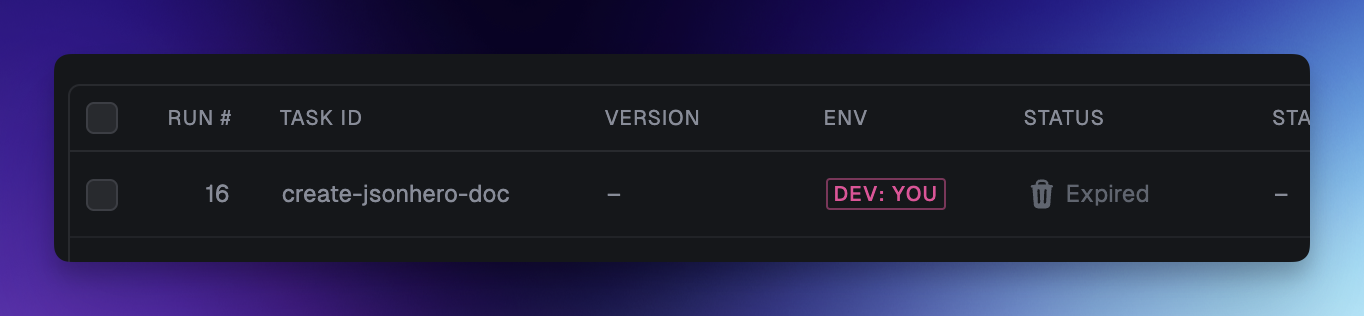 When you use both
 delay and ttl, the TTL will start counting down from the time the run is enqueued, not from the time the run is triggered.
So for example, when using the following code:
- The run is created at 12:00:00
- The run is enqueued at 12:10:00
- The TTL starts counting down from 12:10:00
- If the run hasn’t started by 13:10:00, it will be expired
ttl option only accepts durations and not absolute timestamps.
idempotencyKey
You can provide an idempotencyKey to ensure that a task is only triggered once with the same key. This is useful if you are triggering a task within another task that might be retried:
idempotencyKeyTTL
Idempotency keys automatically expire after 30 days, but you can set a custom TTL for an idempotency key when triggering a task:
queue
When you trigger a task you can override the concurrency limit. This is really useful if you sometimes have high priority runs.
The task:
/trigger/override-concurrency.ts
app/api/push/route.ts
concurrencyKey
If you’re building an application where you want to run tasks for your users, you might want a separate queue for each of your users. (It doesn’t have to be users, it can be any entity you want to separately limit the concurrency for.)
You can do this by using concurrencyKey. It creates a separate queue for each value of the key.
Your backend code:
app/api/pr/route.ts
maxAttempts
You can set the maximum number of attempts for a task run. If the run fails, it will be retried up to the number of attempts you specify.
retry.maxAttempts value set in the task definition.
tags
View our tags doc for more information.
metadata
View our metadata doc for more information.
maxDuration
View our maxDuration doc for more information.
Large Payloads
We recommend keeping your task payloads as small as possible. We currently have a hard limit on task payloads above 10MB. If your payload size is larger than 512KB, instead of saving the payload to the database, we will upload it to an S3-compatible object store and store the URL in the database. When your task runs, we automatically download the payload from the object store and pass it to your task function. We also will return to you apayloadPresignedUrl from the runs.retrieve SDK function so you can download the payload if needed:
We also use this same system for dealing with large task outputs, and subsequently will return a
corresponding
outputPresignedUrl. Task outputs are limited to 100MB.